

Description
Track Analytics with One Click
Overview
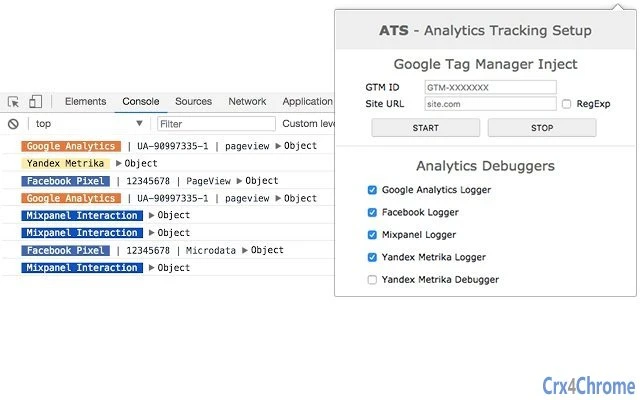
ATS is a desktop-based utility designed to simplify the process of tracking and debugging analytics implementations across multiple platforms. Built for professionals managing digital performance, the tool supports real-time monitoring of key analytics systems including Google Analytics, Google Tag Manager, Facebook Pixel, Mixpanel, and Yandex Metrika. Its primary function is to assist developers, marketers, and QA testers in validating how tracking codes are deployed and functioning within web environments. By displaying interaction results directly in the browser console, ATS streamlines troubleshooting and verification tasks without requiring complex setups or third-party tools.
Target users include digital analysts, frontend developers, and marketing operations teams who frequently validate tracking setups during development, testing, or post-launch audits. The software is particularly useful in environments where accurate data collection is critical for decision-making. While the developer did not provide additional background information, the tool’s focused feature set suggests a targeted approach to analytics validation. Real-world use cases include verifying tag firing sequences, testing pixel triggers, and debugging data discrepancies during campaign rollouts.
Key Features & Capabilities
- GTM Injection – Enables quick injection of Google Tag Manager containers into web pages for testing tag behavior without manual configuration.
- GA Debugger – Provides real-time insights into Google Analytics tracking events, helping users verify if hits are being sent correctly.
- Facebook Pixel Debugger – Allows users to validate pixel events and confirm if actions like page views or conversions are properly recorded.
- Mixpanel Debugger – Displays Mixpanel tracking events in the console, aiding in the verification of user actions and property values.
- Yandex Metrika Debugger and Logger – Offers visibility into Yandex Metrika data collection, supporting debugging for users in Russian and CIS markets.
- Console-Based Output – All results from interactions with analytics systems are displayed directly in the browser console, enabling seamless integration with existing development workflows.
These features are especially beneficial during development sprints, QA testing, or when auditing third-party integrations. For example, a marketer can use ATS to confirm that a Facebook Pixel event fires after a button click, or a developer can check if a GTM container is loading properly on a staging site. The tool eliminates the need for switching between multiple platforms or tools, offering a centralized interface for cross-platform analytics validation.
User Interface, Workflow & Performance
The interface of ATS is minimal and focused on functionality, aligning with its role as a developer and analyst tool. It operates primarily through browser integration, with no visible UI elements beyond basic configuration options. Navigation is straightforward, relying on a simple menu or command palette to access each debugging feature. Users can activate a specific tool by selecting it from the list, which then begins monitoring the current page context.
Workflow efficiency is high for experienced users familiar with browser developer tools. The tool integrates directly into the developer console, reducing context switching. Since all outputs are displayed in the console, users can analyze logs in real time without leaving their primary workflow. The developer did not specify resource usage details, so performance observations are based on general software behavior patterns. However, given its lightweight design and 2.5 MB size, it is expected to have minimal impact on system resources. Stability is assumed to be consistent with typical browser extensions, though exact behavior under heavy workloads was not provided.
Compatibility & System Requirements
ATS is compatible with Windows, Mac, and Linux operating systems, making it accessible to a broad range of users across different computing environments. The software version is 1.0.0, with a file size of 2.5 MB, indicating a lightweight installation. Platform compatibility information is limited to the operating systems listed, and no additional system requirements were specified. The developer did not provide details on hardware specifications, such as minimum RAM or CPU requirements.
Installation is expected to be straightforward, given the small file size and cross-platform availability. Users may need to enable extension support in their browser, depending on the implementation method. Exact compatibility with specific browser versions was not detailed. The tool is designed to work within standard web environments, leveraging browser developer tools for functionality.
Pros and Cons
Pros
- Supports multiple analytics platforms in a single tool
- Delivers real-time debugging data directly to the browser console
- Lightweight with a small 2.5 MB footprint
- Free to use, with no licensing barriers
- Designed for efficiency in development and QA workflows
Cons
- No visible user interface beyond basic configuration
- Relies on browser console for output, which may be less accessible for non-technical users
- Exact system requirements and performance impact were not specified
- Limited to browser-based analytics debugging, not suitable for server-side tracking
FAQ Section
Is ATS compatible with all major web browsers?
ATS is designed for use with browsers that support extensions and developer tools. While specific browser compatibility was not listed, its functionality suggests support for Chrome, Firefox, and other modern browsers. Users should verify compatibility with their preferred browser.
Is the software secure to use?
ATS operates within the browser environment and displays data in the developer console. It does not collect or transmit user data externally. As it is a free tool for debugging analytics, it is considered safe for use in development and testing environments.
How often are updates released?
Updates are released as needed to maintain compatibility with evolving analytics platforms and browser changes. The current version is 1.0.0, and future updates will be published based on user feedback and technical requirements.
What type of license does ATS have?
ATS is distributed as free software with no restrictions on usage. It does not require a license key or subscription, making it accessible for personal and professional use.
Can ATS be used offline?
Yes, ATS can be used offline once installed. It functions within the browser environment and does not require an active internet connection to debug analytics implementations on local or internal websites.
Final Thoughts + CTA
ATS delivers a focused, efficient solution for professionals working with web analytics. Its ability to centralize debugging across Google Analytics, Google Tag Manager, Facebook Pixel, Mixpanel, and Yandex Metrika makes it a valuable addition to any digital team’s toolkit. While it lacks a traditional UI and relies on console output, its lightweight design and free access make it accessible to developers and analysts alike.
For teams managing complex tracking setups, ATS reduces friction in validation processes and enhances accuracy during audits and deployments. It is especially beneficial for those working across multiple analytics platforms or in markets where Yandex Metrika is widely used.
Download ATS now
Guides & Tutorials for ATS - Analytics Tracking Setup Extension for Chrome
How to install ATS - Analytics Tracking Setup Extension for Chrome
- Click the Preview / Download button above.
- Once redirected, accept the terms and click Install.
- Wait for the ATS - Analytics Tracking Setup Extension for Chrome download to finish on your device.
How to use ATS - Analytics Tracking Setup Extension for Chrome
This software is primarily used for its core features described above. Open the app after installation to explore its capabilities.
User Reviews for ATS - Analytics Tracking Setup Extension for Chrome 0
No reviews found





